
A PC game based on the classic Commodore 64 game 
Written by
Mark Rosten, using Blitz 3d
Original version (c) 1984, 1985 Electronic Arts
Programming: Rick Koenig & Connie Goldman, Sound: Dave Warhol
Information - News - Progress
- Screen shots - Contact - Links
Visit my
Forums - Sign my
Guestbook
 Information
After getting to grips programming with Blitz Basic writing my popular Bruce Lee remake, and after a bit of a break from programming, I decided to start a new project using Blitz 3d (the 3d incarnation of this great programming language). As I like the remake challenge I decided to try and create a new version of Racing Destruction Set, based on the original Commodore 64 version (were there other versions?).
The game will be 'based on' the original Commodore 64 version and a not a direct remake (like my almost pixel-perfect Bruce Lee remake was). I'm hoping the game's original look and feel will still be there in this new version, but as it's using a 3d engine instead of 2d it will of course look different to the original. I'm hoping that all of the original's features will be included with a few enhancements here and there.
If you are not familiar with the original game, view a review of it at the Stadium 64 website >here<.
2002-09-01 - Progress update.
I've just added the finishing touches to the track selection screen. I've tried to make it more intuitive and quick to use. It now displays a tool tip like effect to explain the various options, mainly the play list controls. Everything works fine now including the saving, loading, and deleting of this play lists. I've also re-uploaded the last 2 screenshots showing the new changes to the track selection screen (rather than upload seperate images).
Overall progress update:
I'm quite happy with the progress on the game to this date. I don't always get as much time working on it as I would like (Real Life is a pain sometimes  ), but the game is moving along, even if it's the not-so-interesting aspects of it like the menu system. Once all the menu screens are complete I'll be getting back to the main game engine and ripping out the physics code and starting from scratch. The gaming physics book that I ordered from Amazon arrived a few weeks ago so I'll need a couple of weeks digesting that and determining how 'exact' I need to be with the physics and control code.
Edit:
I've just added a newer screenshot showing the track designer as the previous ones were starting to look old.
Plans for this week: Start work on the vehicle selection screen 
2002-08-26 - Progress update and 2 new screenshots.
I've been working on the track selection screen within the menu this week. The original game only showed a list of track names and that was it, but in my game I wanted to show a 3d preview of the selected track (smoothly rotating around). I've also expanded the selection screen to incorporate the playlist selections. You can basically group a bunch of tracks (up to 20 at the moment) into a playlist and save it away for future use. You can add tracks to the playlist and then change the order of the entries or delete entries. All the code for adding to, scrolling within, and deleting entries has been done. All I need to do is allow entry of the playlist name and handle saving and loading of playlists.
I've added 2 new screenshots showing the new track selection screen in action. You can't see from the screenshots but it all fades in and out beatifully. You gotta love desiging a GUI using 3d .You may notice from the screenshots that I've changed the font used for the menus as well. It's only an anti-aliased version of the Comic Sans MS font, but looks better than the first stab at a menu font  .
Plans for this week: Finish the playlist selections on the track selection screen and, if I have time, start work on the vehicle selection screen.
2002-08-18 - Progress update and new screenshot.
I've been coding away on the menu system this weekend. I've removed the temporary 2d backdrop I had in place, along with the moving text that bounced around behind the menu. The saving and loading of the game options is done, as is the initial use of those options in the game (graphics resolution, whether to display shadows/lap times). Today (Sunday) I've been adding the options for the configuring the player controls (input device: keyboard/joystick/gamepad, joystick port/sensitivity, keys). I've added a screenshot showing the first version of this configuration screen. All the items you see on screen are 3d objects, whether they are cubes for the background of selectable items or spheres for option select or custom quads for the text labels themselves. This allows me to fade in and out everything individually and to make life easier determining which options are highlighted by the mouse pointer.
Plans for this week: (1) Test the joystick/gamepad configuration (assuming I can borrow my friend's joystick/gamepad), (2) Remove the ugly control up/down/left/right sprite (a bog standard Paint Shop Pro image) and replace it with 3d objects, and (3) Start work on the track selection screen.
2002-08-10 - Progress update and new screenshot.
I've just posted a new screenshot showing the first version of the menu system. The menu options are all 3d bars which rotate on changing menus. I'll need to tweak the textures of the highlighted options and the logos displayed (the Blitz3d logo is faded in and out every now and then), I'll also probably remove the moving sprite 'Racing Destruction Set' texts which bounce around the screen behind the menu. All I have left to do on the actual menu system is make it work in-game.
The menu system works differently if you call up the menu in-game as the split screen cameras cause a few problems. Hopefully this will be working by the end of the weekend and I can get on with all the menu option screens needed (control selection, inputting player names, track load/save, etc.)
2002-08-05 - Progress update.
After several failed attempts at a new physics engine (just couldn't get the controls how I wanted them) I'm putting the physics re-write on the back burner until a book I've ordered arrives. Until then I'm going to make a start on the menu system and all the things that go along with choosing all the various options of the game. So, progress is moving slowly forward, Just .
The good news is I've got lots of nice little ideas for enhancing the game options.
Things like:
1) Saving and loading race options preferences in different files (pre-made ones will be themed like 'bouncy bouncy' and 'endurance')
2) Saving and loading player profiles (keeping controls per player and any stats the game will keep track of)
3) 'Play lists' for which tracks to play. Simply select a bunch of tracks, along with their race properties (gravity/laps/etc.), save the play list, and play all the tracks one after the other
I've lots more ideas for enhancements to the game, but I'll keep them quiet, for now.
2002-07-21 - Progress update.
A too busy week Real Life (tm) has not left me any time for coding unfortunately  . What little time I've spent today has been on a new physics system to replace the one I have. After playing the original game a bit more (via an emulator) I've realised that I need to scrap my current physics code and start again. This isn't a big problem but due to the lack of time spent coding has meant I'm not as far along as I'd have wished.
Plans for the week: Try to find more time to code and continue with the new physics code
Last 6 news entries shown. Click here to show all news.
All screenshots are WORK IN PROGRESS!
Models/Textures will be changed before a demo is released.
Development shots (menu system shots, track designer shots, etc.):


In-Game shots:
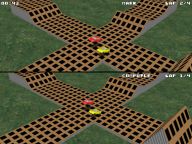
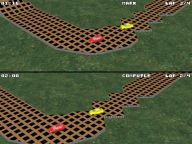


Latest screenshots shown. Click here to show all screenshots.
Please send any feedback by email to Mark on this address:

You can leave an entry in my Guest Book >here<
You can post on my forums >here<
My Bruce Lee remake site -
My remake site for my PC conversion of the classic Commodore 64 game Bruce Lee.
Blitz Coder - Game Developement Resources - Great resource site. Nice tutorials and check out their Showcase section!
Blitz Showcase - Official Blitz Basic Showcase from Guildhall Leisure.
Retro Remakes - Excellent retro remakes site.
Stunt Mania - A remake by Thomas Harte based on 'Sports 4d Driving'. Check out his progress now!

